AI film studio · Built in India

The whole film studio, drafted for you.

Story, script, cast, shots, voices and the edit in one place. Claude writes, Google Veo films, ElevenLabs speaks. Every step starts with a draft. Every word and frame stays yours to change.

200 free credits to start. No card. Pay in rupees for what you render.

  • Video
  • Images
  • Voices
  • Subtitles
  • Grade
  • Edit
  • VFX
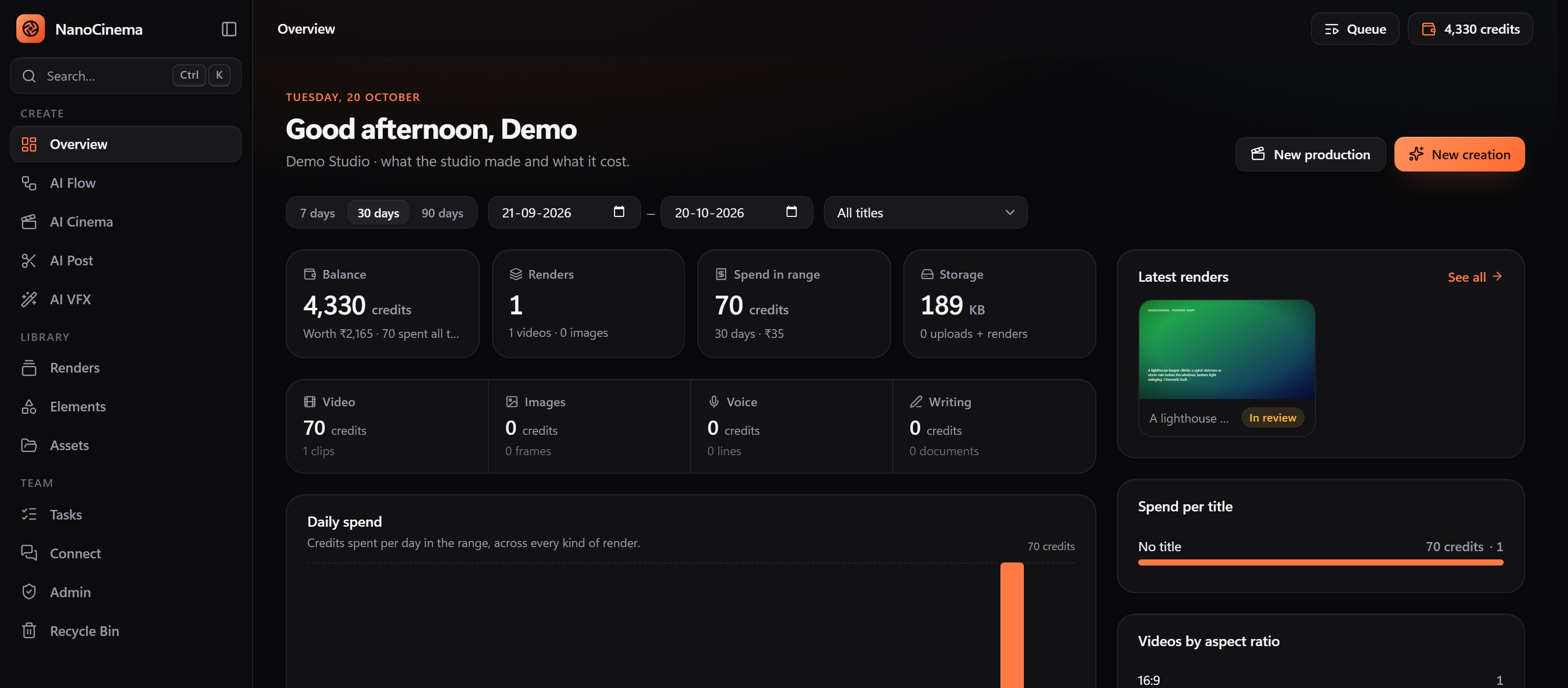
The NanoCinema studio overview: balance, renders, spend by day and the latest renders
Writes with
Claude
Films with
Google Veo 3.1
Stills with
Nano Banana · GPT Image
Speaks with
ElevenLabs
Pays with
Razorpay · UPI · cards

Why

AI film tools are powerful and exhausting.

Most hand you a long chain of screens for a single shot, and a separate app for every other job. Characters drift between shots because nothing carries them forward. You find out what it cost after the fact.

NanoCinema puts the whole production in one place, drafts each step from the one before, keeps the cast the cast, and shows the price before you commit.

The studio

Eight rooms. One building.

Each room does one job well and hands its work to the next. Here is what you get.

AI Flow

One screen per job. No nine-step wizards.

33 single-purpose tools: describe what you want, see the price, press Generate. The result lands in Renders with its prompt, model, seed and cost recorded.

  • Story, single shot, multi-shot scene, short film and dance video
  • Screenplay with a numbered shot list, subtitles and dubbing voices
  • Characters, locations, props, images, edits, upscales and prompt writing
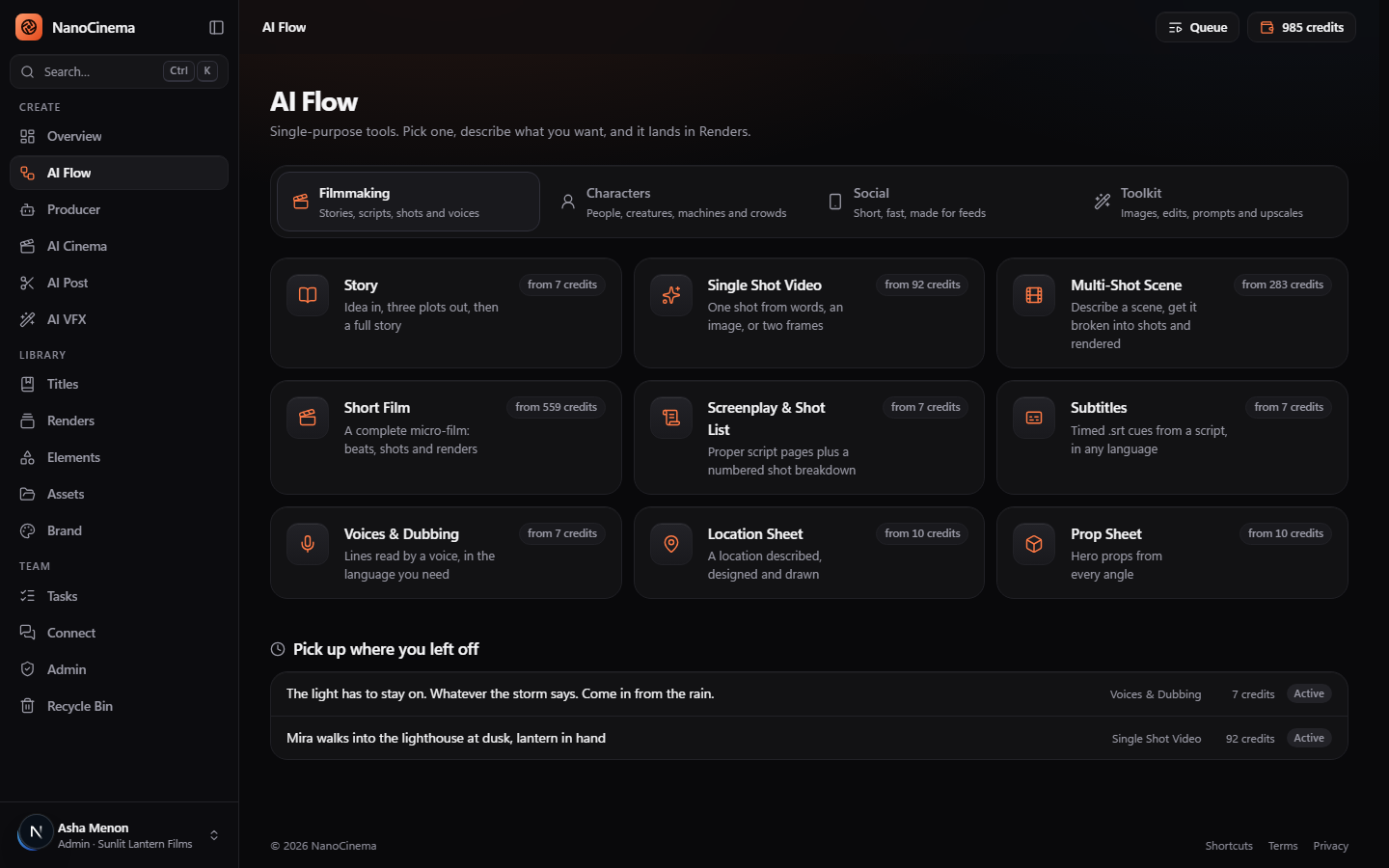
The AI Flow hub: Filmmaking, Characters, Social and Toolkit tools, each with its starting price

Producer

Give it a brief. Get a plan, a price, and a finished film.

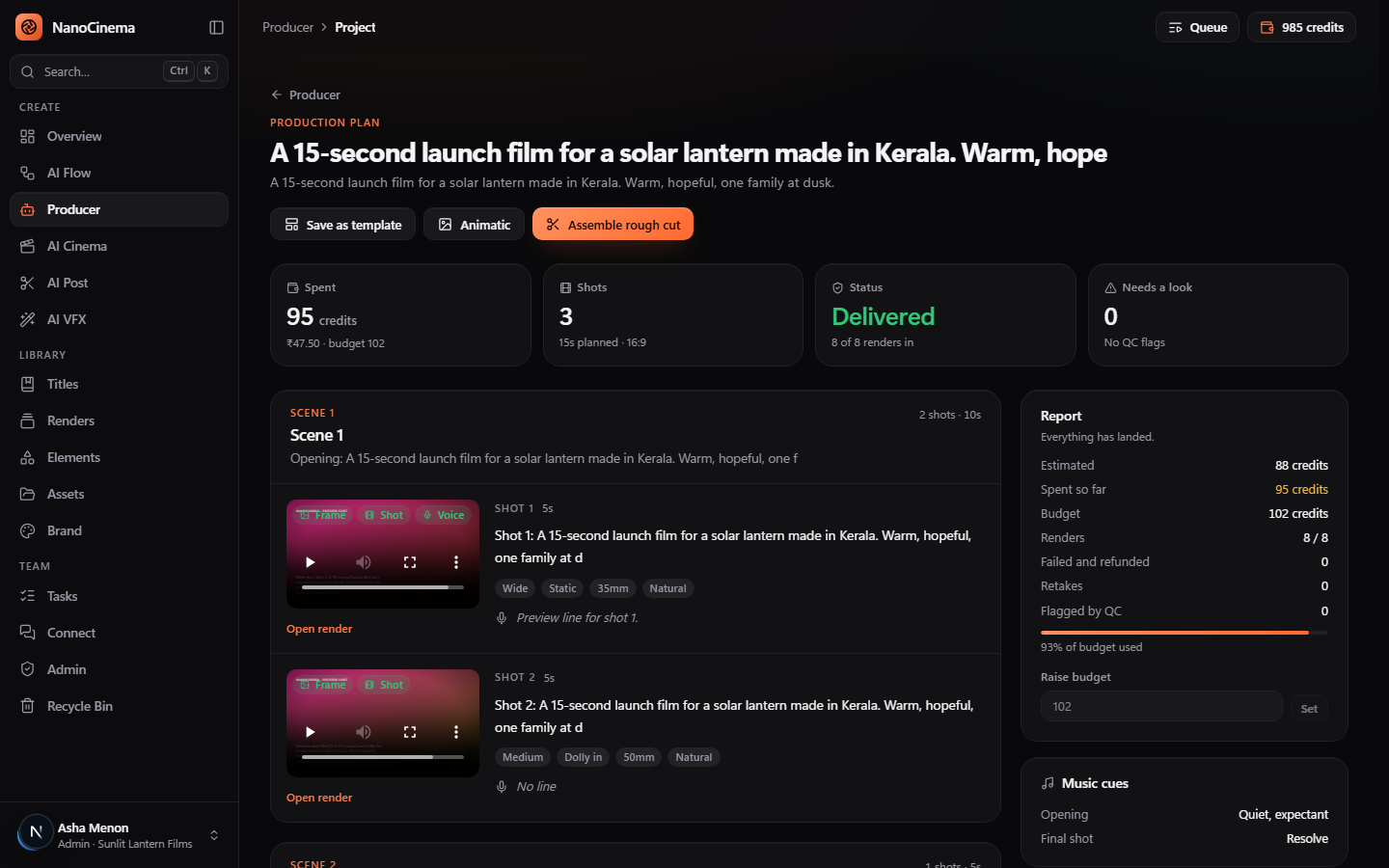
The Producer breaks a brief into scenes and shots, estimates every render, and waits for your approval. Then it produces everything in dependency order, retakes what fails QC, and reports back.

  • Estimate, budget and spend side by side, with a hard stop you set
  • Workflow templates: save a plan and re-run it with a new brief, or in batches
  • Rough cut and animatic assembled straight onto the timeline as editable clips
A Producer plan: spent versus budget, three shots with frames and voice lines, and the delivery report

AI Cinema

A 21-step pipeline for series and features.

Vertical series, web series or feature film: setup, idea, story, cast, voices, locations, episodes, scenes, props, costumes, shots, dialogue, storyboard, motion, video, edit, sound and delivery. Each step is drafted from the ones before it and stays editable.

  • Three plots from one idea, in the storytelling tradition you choose
  • Portraits, location plates and prop sheets rendered from the breakdown
  • Storyboard frames feed the shot videos as their first frame, so the look holds
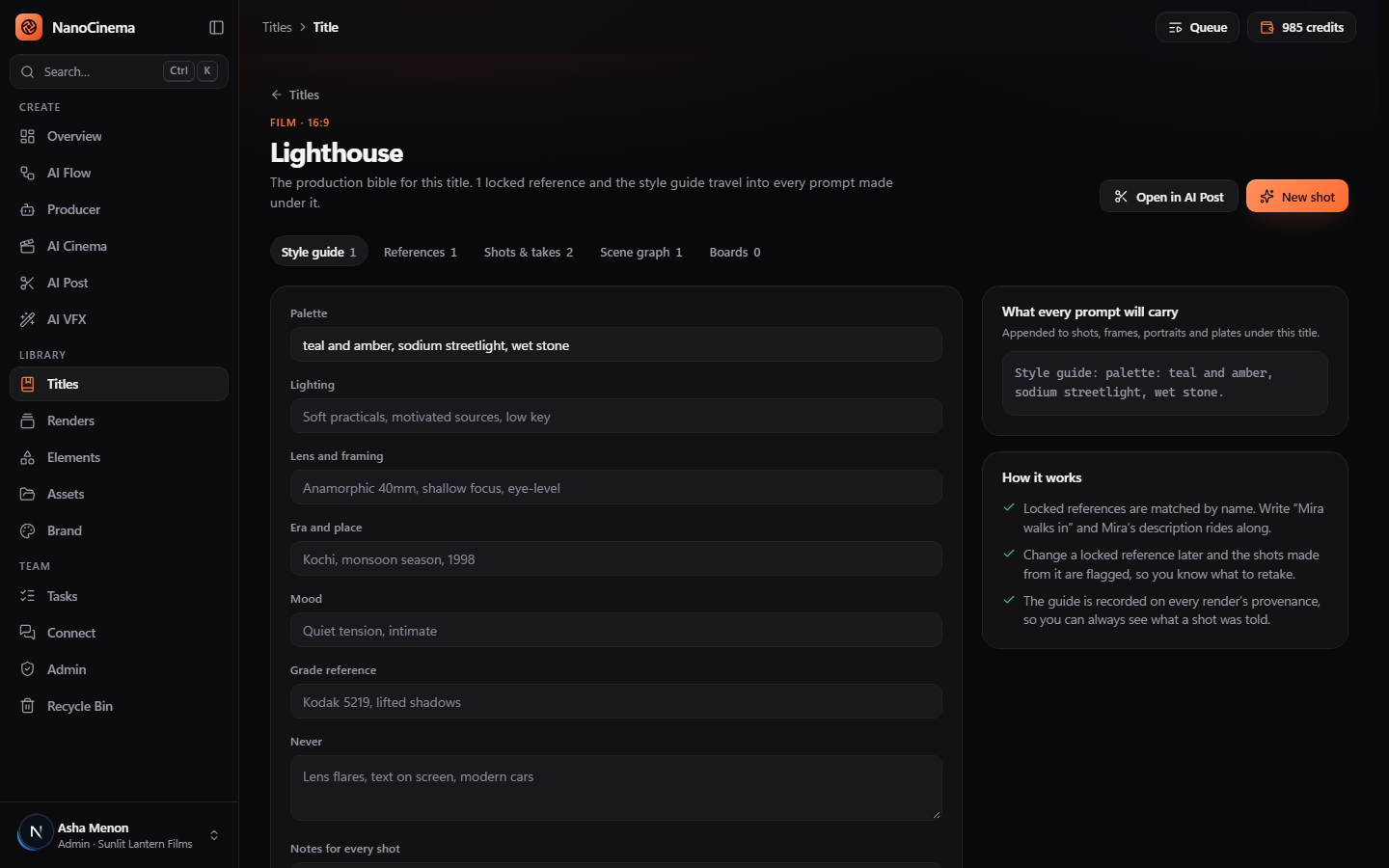
A title's production bible: palette, lighting, lens, era, mood and grade reference, carried into every prompt

Titles and the bible

Continuity that travels with the title.

Every title has a production bible: a style guide and locked references for the cast and places. Write “Mira walks in” and Mira's description rides along. Change a reference later and the shots made from it are flagged for a retake.

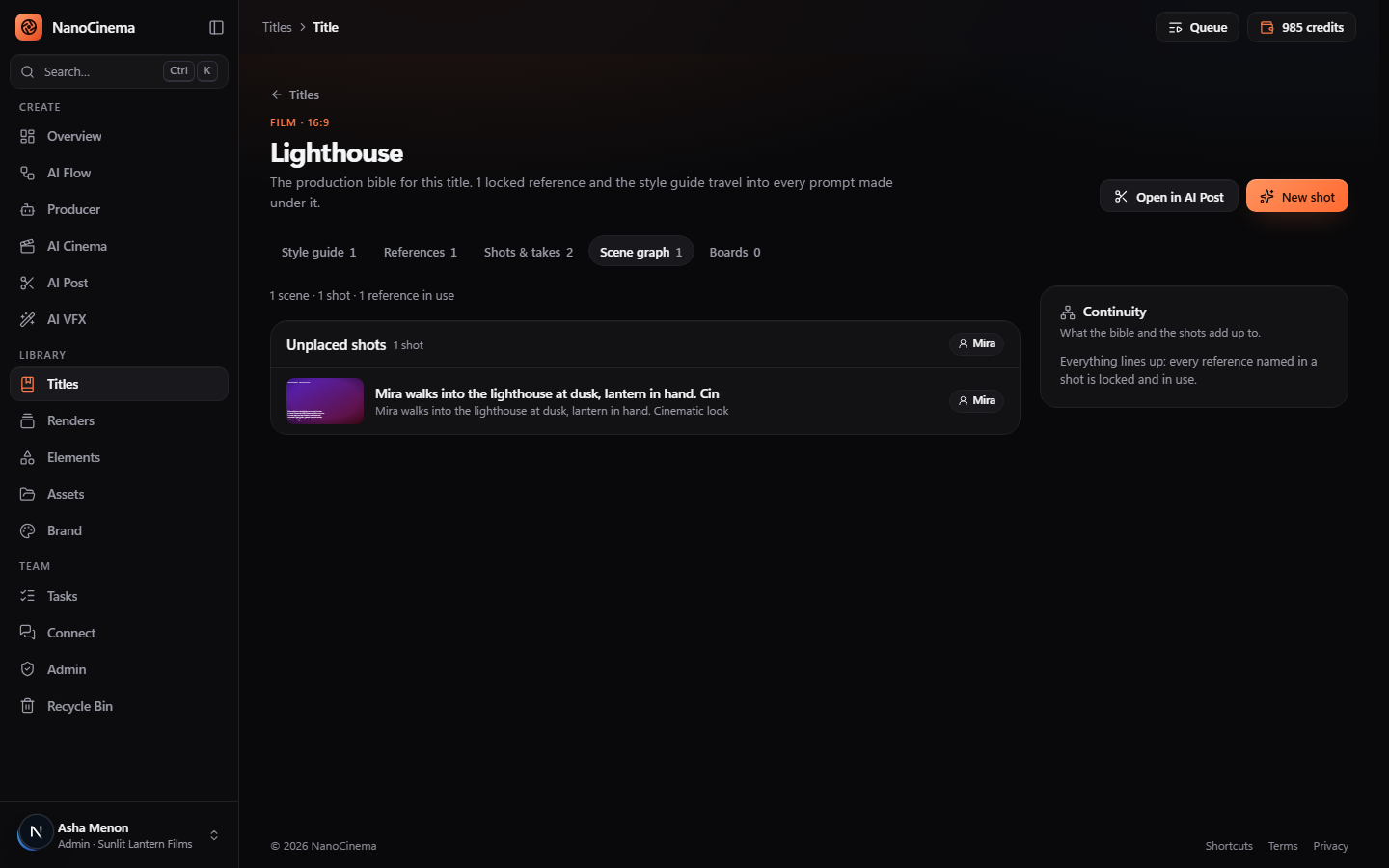
  • Scene graph of shots, references and places, with a continuity report
  • Takes: retake a shot, compare, and pick the one that drives the storyboard and cut
  • Mood boards, director presets and studio presets per title
The scene graph for a title with its continuity report

AI Post

An editor that keeps up with your hands.

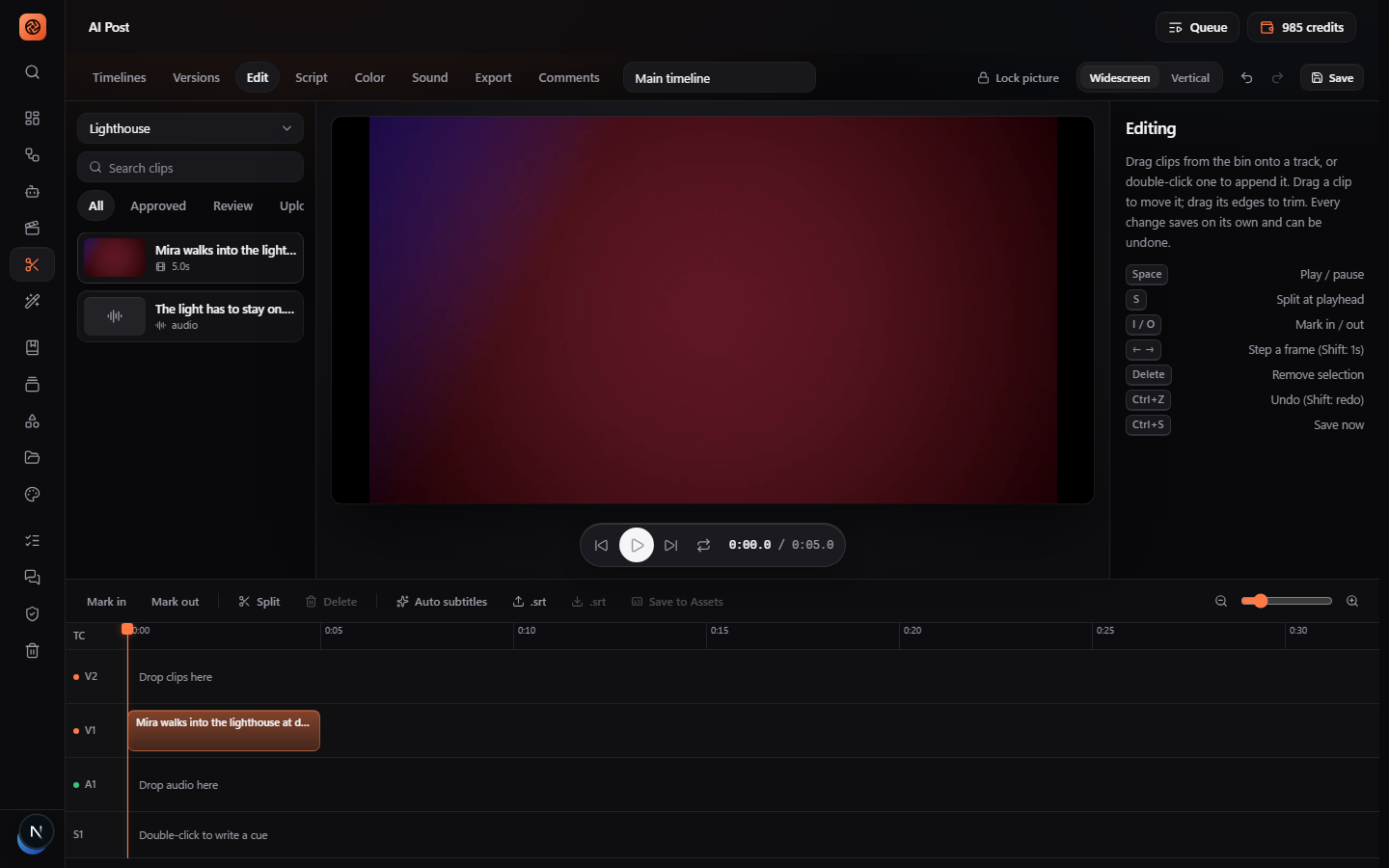
Approved shots and voice lines land in a real multi-track timeline. Clips follow your pointer exactly and snap to their neighbours. Space to play, S to split, I and O to mark. Every change saves on its own and can be undone.

  • Edit by text: strike a sentence in the Script tab and it leaves every track
  • Record voice-over onto A1 in the browser; auto subtitles; colour and sound tabs
  • Versions with restore, time-coded comments, picture lock and export
The AI Post timeline: preview, V1 and V2 video tracks, A1 audio and S1 subtitles with keyboard shortcuts

Renders

Everything the studio made, checked before you see it.

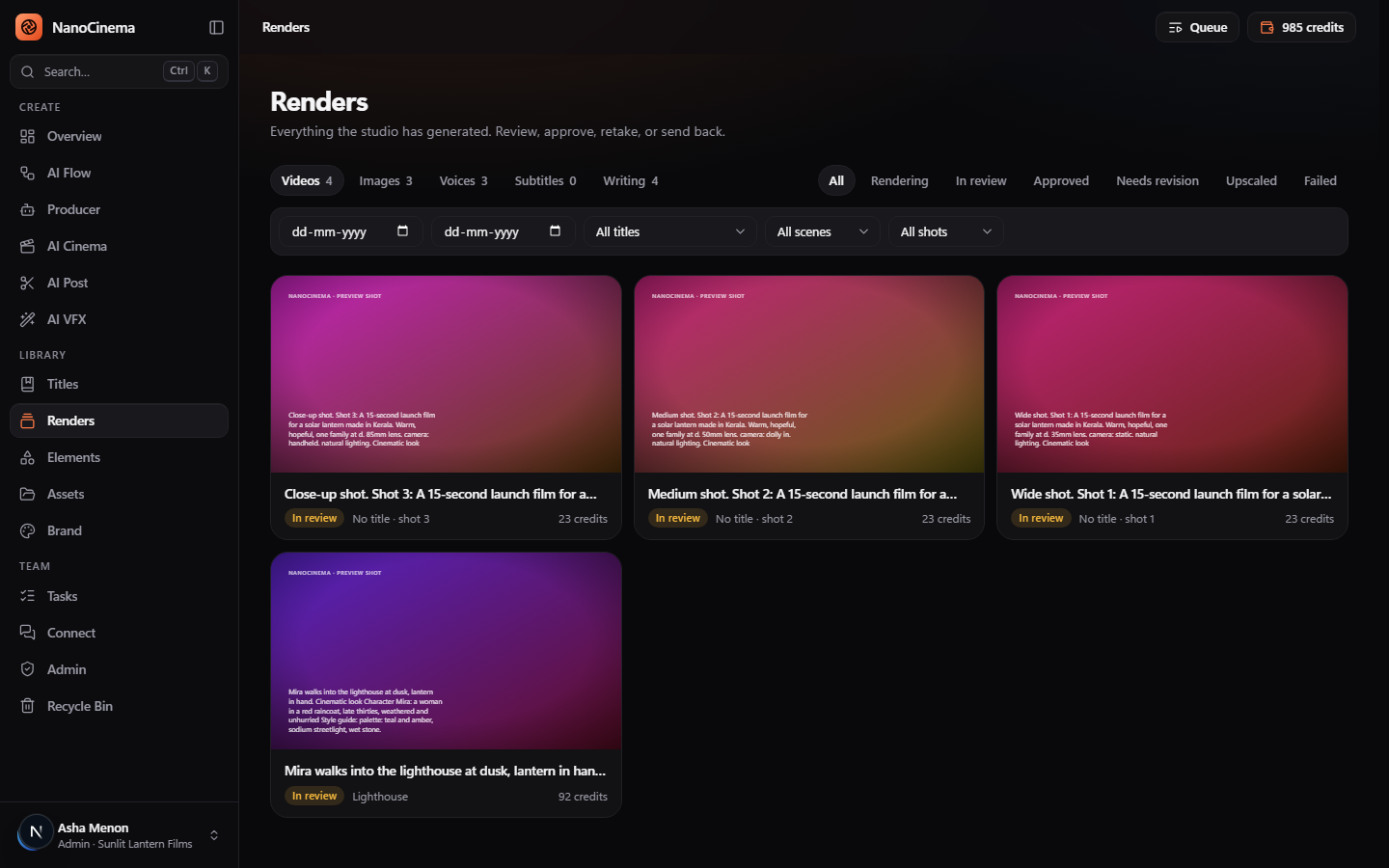
Each render is QC'd on arrival: duration, aspect ratio, resolution, audio and file health. Problems are flagged for review, failures refund themselves, and the provenance panel shows exactly what the model was told.

  • Approve, request a revision, retake or send back, per render
  • Filter by type, status, title, scene, shot and date
  • Seed, model, version and style guide recorded on every file
The Renders library with videos, images, voices and writing, filtered by status

Brand Studio

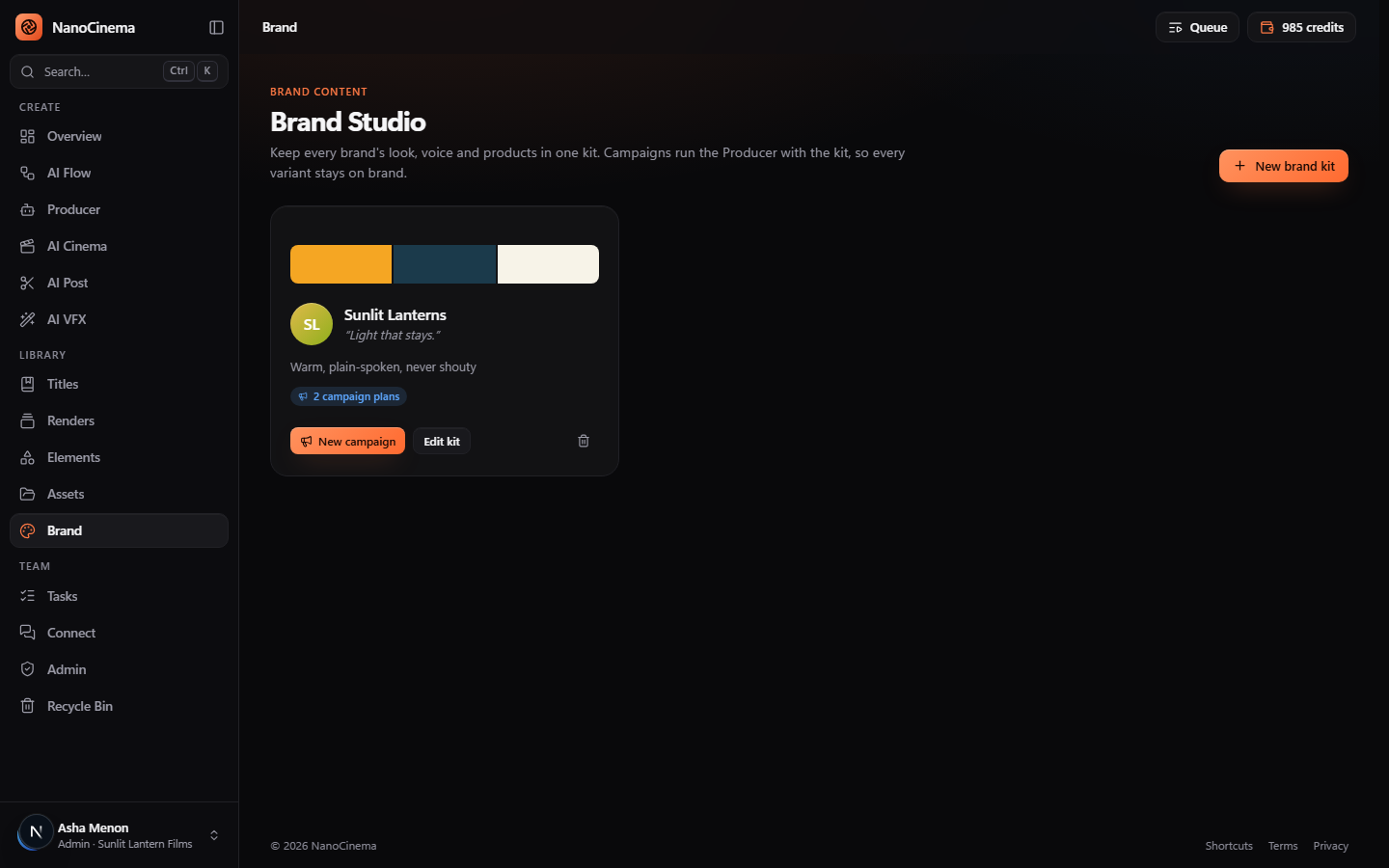
For agencies: a kit per brand, variants per campaign.

Keep each brand's palette, voice and products in one kit. Campaigns run the Producer with that kit, so every variant across formats and languages stays on brand.

  • Campaign variant packs: one brief, many aspect ratios and languages
  • Localise a cut: translated cues, dubbed tracks, per-language exports
  • Asset rights: licence, holder, expiry and permitted use on every asset
Brand Studio with a brand kit card: palette, voice and campaign plans

Team and Admin

Built for a studio, not a single seat.

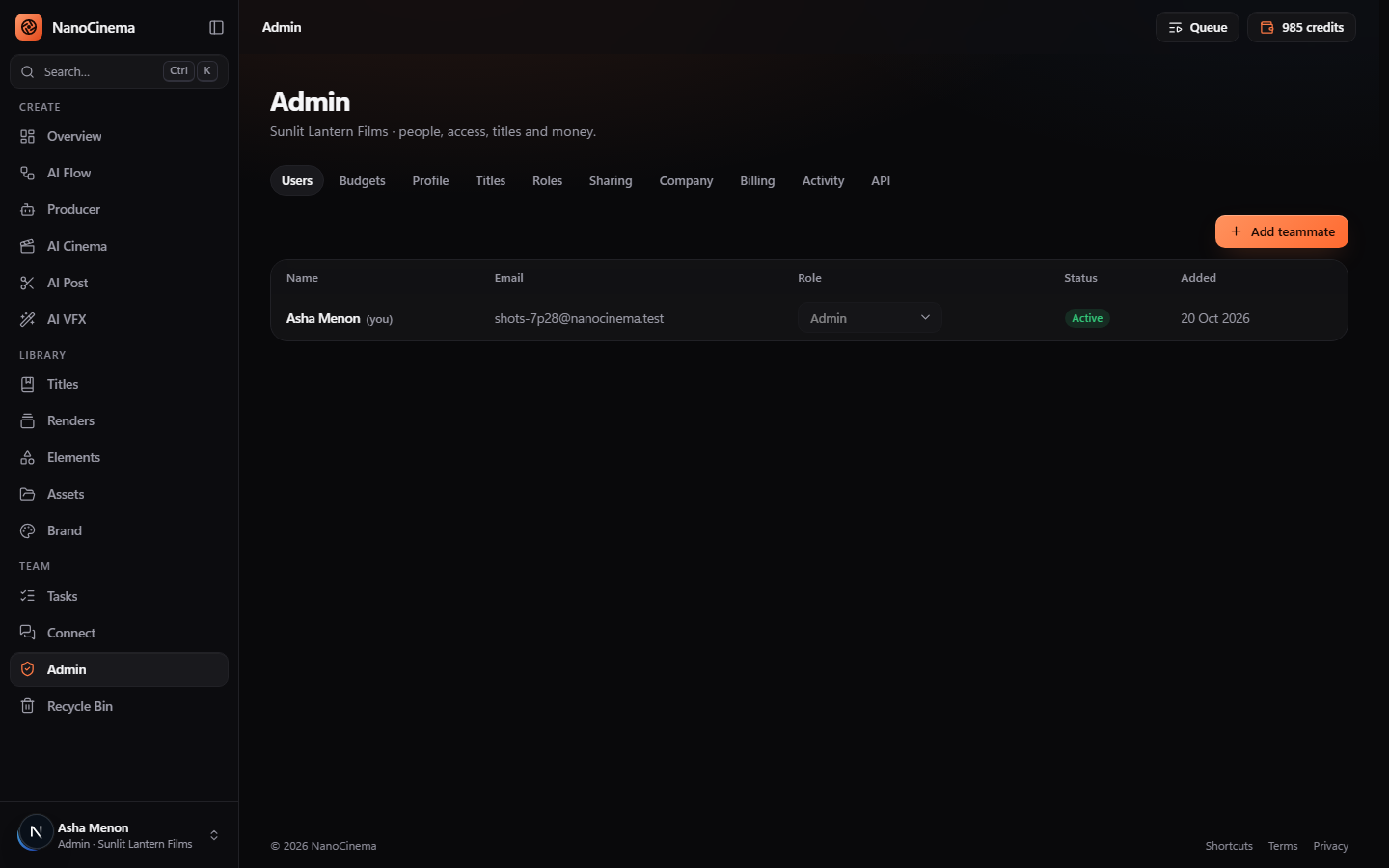
Invite people with roles, give each a monthly budget, set an approval threshold for big renders, and review what they make. Tasks, support chat, an activity log and a recycle bin keep the place tidy.

  • Roles with fine permissions; per-person and per-project budgets
  • Client review links that expire, with approve or request changes
  • REST API with scoped keys and signed webhooks for your own tools
Admin: users, roles, titles, budgets, billing and the API tab

AI Flow tools

33 tools, each a single screen

Pick one, describe what you want, see the price, press Generate. Prices start from these, on today's standard models.

Filmmaking

Stories, scripts, shots and voices

  • Story

    from 19 credits

    Idea in, three plots out, then a full story

  • Single Shot Video

    from 138 credits

    One shot from words, an image, or two frames

  • Multi-Shot Scene

    from 138 credits

    Describe a scene, get it broken into shots and rendered

  • Short Film

    from 138 credits

    A complete micro-film: beats, shots and renders

  • Screenplay & Shot List

    from 19 credits

    Proper script pages plus a numbered shot breakdown

  • Subtitles

    from 19 credits

    Timed .srt cues from a script, in any language

  • Voices & Dubbing

    from 7 credits

    Lines read by a voice, in the language you need

  • Location Sheet

    from 10 credits

    A location described, designed and drawn

  • Prop Sheet

    from 10 credits

    Hero props from every angle

Characters

People, creatures, machines and crowds

  • People

    from 10 credits

    Lead cast and supporting faces

  • Robots

    from 10 credits

    Machines with personality

  • Animals

    from 10 credits

    Real or imagined creatures

  • People Crowds

    from 10 credits

    Background extras at any scale

  • Animal Herds

    from 10 credits

    Flocks, packs and swarms

  • Robot Fleets

    from 10 credits

    Armies, factories, swarms

Social

Short, fast, made for feeds

  • Dance Video

    from 138 credits

    Bring a photo to life with a dance move

Toolkit

Images, edits, prompts and upscales

  • Image

    from 10 credits

    Text to image, or remix a reference

  • Edit Image

    from 10 credits

    Change anything in an image with words

  • Scene Frame

    from 10 credits

    A single composed frame of a scene

  • Prompt Writer

    from 19 credits

    Turn a rough idea into a production-ready prompt

  • Modify Video

    from 138 credits

    Restyle or change a clip you already have

  • Restyle Image

    from 10 credits

    Keep the composition, change the look

  • Upscale

    from 14 credits

    Sharper, larger, cleaner

VFX

Fix, extend, replace and build shots

  • Change Background

    from 10 credits

    Swap the world behind your subject

  • Replace Green Screen

    from 10 credits

    Key out the screen, drop in an environment

  • Remove Objects

    from 138 credits

    Paint out people, rigs and mistakes

  • Add Objects & FX

    from 138 credits

    Sparks, smoke, debris, creatures

  • Motion Capture

    from 138 credits

    Drive a character with a reference performance

  • Full Shot VFX

    from 138 credits

    Plate in, finished shot out: set, look, motion

  • Virtual Environment

    from 10 credits

    A world you can shoot from any angle

  • Virtual Prop

    from 10 credits

    Hero prop with turntable views

  • Virtual Set Design

    from 10 credits

    Layout map first, then the composed set

  • Set Extension

    from 10 credits

    Build the set beyond what you shot

AI Cinema

21 steps from idea to delivery

For vertical series, web series and feature films. Every step is drafted from the ones before it, and every item on it is yours to edit before the next step reads it.

  1. Develop

    1. 1

      Setup

      Format, length, languages and look for the whole project.

    2. 2

      Idea

      Start from an idea and pick one of three plots.

    3. 3

      Story

      Grow the chosen plot into a full story.

  2. Cast and world

    1. 4

      Characters

      The cast, with a reference portrait for each so they stay consistent.

    2. 5

      Voices

      Give every character a voice and hear a sample line.

    3. 6

      Location Plates

      Every place the story happens, with an empty establishing plate.

  3. Break it down

    1. 7

      Episodes

      Break the story into episodes (a feature has one).

    2. 8

      Scenes

      Scenes for each episode.

    3. 9

      Scene Props

      Props each scene needs.

    4. 10

      Scene Characters

      Who appears in each scene, and in what state.

    5. 11

      Scene Locations

      Which location, time of day and weather each scene uses.

    6. 12

      Scene Costumes

      Wardrobe per character per scene.

  4. Shoot

    1. 13

      Shots

      The shot list: framing, movement and action for every shot.

    2. 14

      Dialogues

      Every spoken line, tied to its shot.

    3. 15

      Storyboard

      One frame per shot.

    4. 16

      Motion Reference

      Optional reference clips that guide movement in a shot.

    5. 17

      Videos

      Render every shot. Storyboard frames are used as the first frame when they exist.

  5. Finish

    1. 18

      Editing

      Cut the approved shots together in AI Post.

    2. 19

      Sound Design

      Record the dialogue and plan music and effects.

    3. 20

      Color Grading

      A grade direction per scene.

    4. 21

      Final Outs

      Everything approved, ready to deliver.

Direction

You direct. The model obeys.

Every shot tool carries the same director controls. Leave them on Auto and the model decides; set them and they are written into the prompt word for word.

Framing

  • Extreme wide
  • Wide
  • Medium
  • Close-up
  • Extreme close-up
  • Over the shoulder
  • Insert

Lens

  • 14mm
  • 24mm
  • 35mm
  • 50mm
  • 85mm
  • 135mm
  • Macro

Lighting

  • Natural
  • Golden hour
  • Blue hour
  • Overcast
  • Hard sun
  • Neon
  • Candlelight
  • High key
  • Low key
  • Studio

Time of day

  • Dawn
  • Day
  • Dusk
  • Night

Mood

  • Calm
  • Tense
  • Joyful
  • Melancholy
  • Epic
  • Intimate
  • Eerie
  • Playful

Start from a frame

Text, an image, or a first and last frame. Storyboard frames and character portraits feed the shots that use them.

Presets and looks

Built-in director presets and your studio's own, saved from any shot and applied with one click.

Era and performance

Set the decade and the acting register, and the bible's style guide travels along with every shot.

Models

The best model for each job, switchable per shot

Auto picks your studio's tier: Fast for drafts, Standard for the everyday, Best for finals. Or choose the exact model on any shot. Prices are in credits and appear on every button before you generate.

Writing

per step
  • Claude Haiku 5.5

    Quick and cheap: subtitles, translations, short rewrites.

    Fast3 credits
  • Claude Sonnet 5.5

    Everyday writing at speed.

    Fast7 credits
  • Claude Opus 5.5

    The studio default: plans, stories, screenplays.

    Standard19 credits
  • Claude Fable 5.1

    Anthropic's most capable model, for the hardest writing.

    Best46 credits

Video

per 5 s shot
  • Veo 3.1 Fast

    Google Veo with sound, through ElevenLabs. 4 to 8 second clips at 720p.

    Standard138 credits
  • Veo 3.1

    Google's best: cinematic realism with sound, 1080p, through ElevenLabs.

    Best550 credits
  • Seedance 2.5

    Up to 30 seconds with sound. ElevenLabs must approve ByteDance models for the account first.

    Standard92 credits

Images

per image
  • Nano Banana 2

    Google's fast image model, through ElevenLabs. Up to 14 reference images.

    Standard10 credits
  • Nano Banana Pro

    Google's best stills, up to 4K, through ElevenLabs.

    Best33 credits
  • GPT Image 2.5

    OpenAI's image model, through ElevenLabs. Strong on text and layout.

    Best28 credits

Voices

per line
  • Eleven Flash v2.5

    Lowest latency, 32 languages.

    Fast5 credits
  • Eleven Turbo v2.5

    Fast with better quality than Flash.

    Fast5 credits
  • Eleven v4 Turbo

    The v4 voice at speed, 94 languages.

    Standard7 credits
  • Eleven Multilingual v2

    The long-standing workhorse, 29 languages.

    Standard7 credits
  • Eleven v4

    Newest and most natural, 94 languages.

    Best12 credits
  • Eleven v3

    Most expressive delivery, audio tags for emotion.

    Best10 credits

And the rest

Made for the way a production actually runs

Control the money

  • Price before you press

    Every Generate button shows its cost. The amount is held, not charged in surprises.

  • Failures refund themselves

    A provider error returns the credits to the wallet at once, with the reason on the render.

  • Budgets and thresholds

    Per project, per person, per month. Renders above a threshold wait for approval.

  • Rupees, no subscription

    Credit packs by UPI, card or net banking. Nothing renews behind your back.

Keep continuity

  • Production bible

    Style guide and locked references injected into every prompt under the title.

  • Scene graph

    Shots, references and places as a graph, with a continuity report that names the gaps.

  • Takes and compare

    Retake any shot. One selected take drives the storyboard and the timeline.

  • QC and provenance

    Duration, aspect, resolution and audio checked. Seed and model on every file.

Finish and deliver

  • Edit by text

    Strike a line in the script and it leaves video, audio and subtitles together.

  • Handoff package

    A zip with media, EDL, FCPXML, OTIO, SRT and a manifest for Resolve or Premiere.

  • Localisation

    Translated cues, dubbed tracks and per-language, per-aspect exports from one cut.

  • Content credentials

    A signed manifest per export, linked from the MP4 and the provenance panel.

Run as a team

  • Roles and permissions

    Admin and Creator out of the box; make your own with exactly the rights you want.

  • Review and comments

    Time-coded comments on renders and timelines. Client links that expire.

  • Versions and activity

    Timeline versions with restore, an activity log for sensitive operations, a recycle bin.

  • API and webhooks

    Scoped keys, signed webhooks and workflow templates you can run in batches.

Works in your language

Subtitles, dubbing and localisation in the languages India actually speaks, and the world's.

Picture lock

Lock a cut and the timeline refuses silent changes until someone with the right unlocks it.

Elements and assets

Characters, locations, props, voices and LUTs saved once and reused across titles. Folders and uploads for everything else.

Pricing

Credits, not a subscription

Renders draw from prepaid credits at the price shown on the button. Failed renders are refunded automatically. One credit is fifty paise.

Pay as you go

Filmmakers, studios and agencies

₹0a month

  • Pay only for what you render
  • 200 free credits to start, no card
  • Every tool, the Producer and the 21-step pipeline
  • Credit packs from ₹499, with bonus credits on bigger packs
Open a studio

Typical prices

Shown on every button before you generate

₹69per 5s shot · 138 credits

  • Images from ₹5
  • Voice lines from ₹3.50
  • Writing steps from ₹9.50
  • Edit, subtitles from your script, and export: free
See it in the studio

Starter

1,000

credits · ₹499

Creator

2,100

credits · ₹999+5%

Studio

5,600

credits · ₹2,499+12%

Questions

Before you start

Which models does it use?

Claude writes the plots, scripts and plans. Google Veo 3.1 films the shots and Nano Banana and GPT Image make the stills, through ElevenLabs' Image & Video API. ElevenLabs voices the lines. You choose the model per shot or let Auto pick your studio's tier; more models switch on as providers enable them.

Do I own what I make?

Yes, subject to the terms of the model providers. Exports carry signed content credentials so you can show where a frame came from. See the Terms.

What if a render fails?

The cost is refunded to the wallet automatically, and the failure reason is shown on the render. Renders that come back wrong are flagged by QC for a retake.

Can I bring a script I already have?

Yes. Import a plain-text or Fountain script; it is analysed into characters, locations, scenes and dialogue, and you jump straight to breakdown.

Is there a subscription I'll forget to cancel?

No. You buy a credit pack with UPI, card or net banking, and renders draw from it at the price on the button. Nothing renews.

Can my team share a studio?

Yes. Invite people with roles, give each a monthly budget, set an approval threshold, and review and approve their renders. Clients get review links that expire.

Does it work with my editor?

Export a handoff zip with the media plus EDL, FCPXML, OTIO and SRT, and open it in DaVinci Resolve, Premiere or Final Cut. Or finish in the built-in editor and export the MP4.

Is NanoCinema part of NanoSkool?

Yes. Sign in with the same Google or phone account you use for NanoMath and NanoSkool LMS, or with an email and password.

Make the first scene tonight.

One line of story is enough to start. 200 credits are on the house.